The homepage interface of Steam mall has been greatly revised, and it is more accurate.
Recently, V Club has changed the homepage of its famous PC game platform Steam. What has changed this time? Let’s have a look together!

New version of Steam mall page
Page address of Steam mall:
The main changes are as follows:
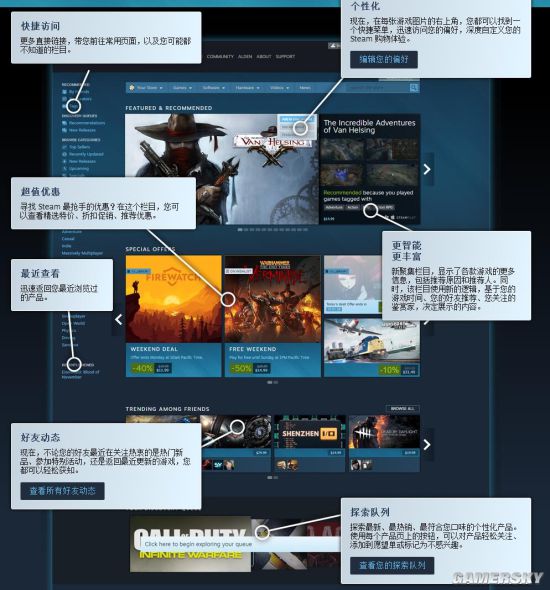
1. Only the quick access bar is added on the left side of the mall.
More direct links take you to frequently used pages and columns that you may not even know.
2. You can subscribe to the game recommendation items according to your own preferences.
Now, in the upper right corner of every game picture, you can find a shortcut menu to quickly access your preferences and deeply customize your Steam shopping experience.
3, increase the value-added discount plate
Looking for the most sought-after discount on Steam? In this column, you can view featured specials, discount promotions and recommended offers.
4. Add recommended game bar and increase recommended reasons.
The new gathering column shows more information about each game, including the recommendation reasons and referees. At the same time, this column uses new logic, based on your game time, your friends’ recommendation, and the connoisseurs you care about, to decide the content to be displayed.
5. Below the quick access bar, you can view the recently browsed projects.
Quickly return to the products you have visited recently.
6. Add a friend dynamic section below the value-added discount.
Now, whether your friends are concerned about hot new products, attending special events or returning to the latest games, you can easily know.
7, explore the queue plate
Explore the latest, best-selling and personalized products that best suit your taste. Using the buttons on each product page, you can easily follow the product, add it to the wish list, or mark it as uninterested.
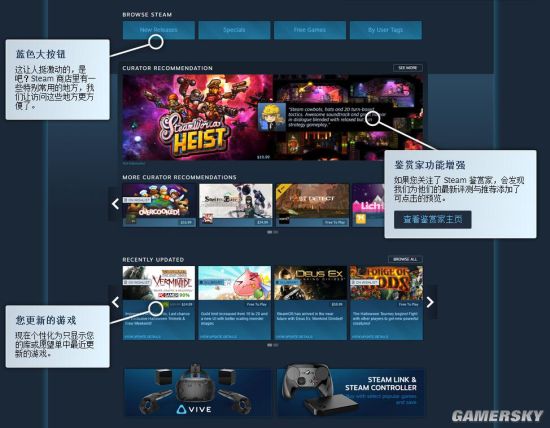
8. Add the big blue button
This is quite exciting, isn’t it? There are some commonly used places in the Steam store, and we have made it more convenient to visit these places.
9. The function of connoisseur has been enhanced.
If you follow the Steam connoisseurs, you will find that we have added a clickable preview for their latest reviews and recommendations.
10. Personal column (only show updated games)
Personalize to show only the latest games in your library or wish list.
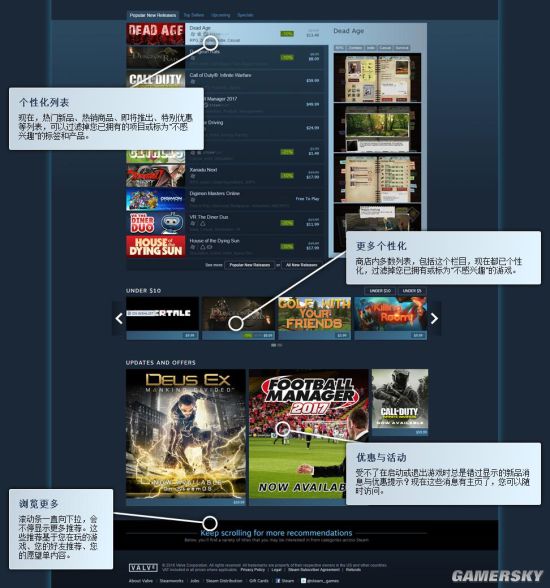
11. The filtering function is added to the game ranking.
Now, the list of hot new products, hot goods, upcoming products, special offers, etc. can filter out the items you already have or the labels and products marked as "not interested".
12, more personalized to increase the filtering function
Most lists in the store, including this column, are now personalized, filtering out games that you already own or mark as "not interested".
13. It is recommended to add the "Offers and Activities" section to the pop-up window.
Can’t stand the new product messages and offers that are always missed when starting or quitting the game? Now these messages have a home page, and you can visit them at any time.
14. Browse more games
The scroll bar keeps pulling down, and it will keep showing more recommendations. These recommendations are based on the game you are playing, your friends’ recommendations and the content of your wish list.
Steam has been improving, trying to make its own clients more personalized and closer to the people. How about it? Does this change satisfy you? But then again, the PC version of the store page has changed. Can the mobile version of the client be upgraded by the way? For example, make compatibility better?
Homeless Steam genuine online group:
If you are interested in online games on Steam, you can directly click the icon to join the QQ group for discussion:
